
Artificial intelligence (AI) is no longer just a futuristic concept — it’s now part of everyday life. In this guide to the best AI tools for beginners in 2026, you’ll discover easy-to-use platforms that help with writing, design, coding, and productivity. Whether you’re a student, freelancer, or professional, these tools can help you get started quickly without any technical experience.

AI has become mainstream, powering tools from chatbots to video generators. Today’s AI assistants can draft emails, design graphics, and even summarize meetings. In this guide, we’ll explore the best AI tools for beginners in 2026, covering use cases, ease of use, and what makes each one special. You’ll find unique insights and tips (not generic lists) to help you pick the right AI assistant and get started quickly
Top Best AI Tools for Beginners in 2026
ChatGPT (OpenAI). The most popular entry point into the best AI tools for beginners in 2026 is ChatGPT. It’s a general-purpose AI chatbot for writing, coding, research, and more. The latest version, GPT-5.4 (released 2026), is faster and smarter, able to plan its answers and handle longer context. Beginners love ChatGPT’s simple chat interface – just type questions or prompts, and it responds in natural language. It can write emails, brainstorm ideas, solve homework problems, or analyze data. A free plan lets you try it out immediately, while paid “Plus/Pro” subscriptions ($20+/mo) unlock the fastest GPT-5.4 model and more features. In practice, users find it saves time: “It’s very versatile (writing, coding, learning, planning)…summariz[es] long documents clearly,” notes one guide. ChatGPT is the go-to tool for many beginners due to its flexibility and ease of use.
Google Gemini. Another top choice is Google’s Gemini (the successor to Bard). Gemini offers powerful AI in a familiar package – it’s built right into Google apps and search. The free tier (Gemini Flash/Basic) handles text, images, audio, and video queries with decent speed. Google also offers a $19.99/month Gemini Pro (via Google AI Pro) with advanced features – up to 1 million tokens of context (about 1,500 pages of text) and higher usage limits. Importantly, Gemini is integrated with Google Workspace: new features let you ask Gemini to “draft a newsletter” or “fill a spreadsheet” right within Docs or Sheets. For example, Gemini in Docs can create a first draft from your meeting notes, then refine tone and style with simple prompts. In Slides, Gemini can even generate entire slide designs from a sketch or prompt. In short, Gemini brings AI into tools beginners already use. It’s nearly as easy as ChatGPT (just type your instructions), and Google’s documentation makes it clear how to access the new Workspace features.
Claude 3 (Anthropic). Claude is another chat-based assistant known for accuracy and long-context understanding. It isn’t as widely talked about for beginners as ChatGPT, but Claude’s free tier is excellent for writing and summarization. Claude Sonnet 3.5 and Sonnet 4 (2026 releases) are tuned for thorough, thoughtful answers, making them good for essays or analyses. The trade-off is that Claude’s interface is similar to others – you need to prompt it – so we mention it for completeness. Beginners might prefer ChatGPT or Gemini for multi-purpose use, but Claude is great if you want a “safe” assistant for drafting professional text.
Other Conversational Tools. A few other AI assistants are worth a mention. Grok (from xAI) focuses on up-to-the-minute info and image/video queries, but it’s newer and less mainstream. NotebookLM (Google’s research assistant) lets you upload personal documents (PDFs, transcripts) and then query them; it’s ideal for students doing research. But it’s still in development. As a beginner, you’ll get far without these niche tools, so focus on ChatGPT/Gemini first.
Creative & Design AI Tools for Beginners in 2026
Canva AI (Design). For visual design, Canva is a beginner’s dream. It offers thousands of drag‑and‑drop templates for social graphics, presentations, posters, videos, and more. Its AI features (branded “Canva AI”) make design easy: tools like Style Match automatically generate new images that fit your existing design style. You can also describe a design in words (even using ChatGPT or Claude for ideas), and Canva will generate an on-brand graphic. New additions (2026) include turning still images into short videos and auto-generating slides from text prompts, all with a few clicks. With its browser interface, beginners don’t need any software skills – just a free Canva account. The free plan includes many templates and AI tools; a Pro subscription unlocks premium assets (stock images, templates), brand kits, and advanced features. In short, Canva AI makes it trivial to create polished visuals and even video content without design experience.
Image Generators (DALL·E, Midjourney, Leonardo). If you want custom images or art, AI image generators are powerful. DALL·E 3 (OpenAI) and Midjourney V7 (2026) can produce stunning artwork from text prompts. Midjourney, for instance, excels at creative, stylized images that artists love. These tools do require some prompting skill, but even beginners can get pretty good results by copying examples. OpenAI’s DALL·E and Meta AI’s tools are also user-friendly (often with simple web interfaces). For a fully guided experience, Canva’s built-in image generator or Microsoft Designer (Synonym for DALL-E) may be easier since they walk you through styles. A quick comparison:
| Tool | Category | Main Use | Pricing | Ease for Beginners |
|---|---|---|---|---|
| ChatGPT | Chatbot/Assistant | Writing, coding, Q&A | Free; $20/mo for Plus | Very easy (chat-based) |
| Google Gemini | Chatbot/Assistant | Docs/Sheets drafts, search | Free; $20/mo Pro | Easy (in Google apps) |
| Canva AI | Design/Creativity | Graphics, presentations | Free; Pro tier | Very easy (templates) |
| Grammarly | Writing Assistant | Grammar, tone, editing | Free; Premium plans | Very easy (browser plugin) |
| Notion AI | Productivity/Notes | Summaries, brainstorming | Free plan; AI add-on | Moderate (learning Notion) |
| Jasper | Content Creator | Marketing copy, blog posts | Paid subscription | Easy (guided prompts) |
| DALL·E/Midjourney/Leonardo | Image Generation | AI art from text | Varies (credits/sub) | Moderate (some prompt skill) |
| ElevenLabs | Voice/Audio | Text-to-speech, voice clones | Free trial; Paid tiers | Easy (text-based) |
| Fathom | Meetings/Summarize | Transcribe & summarize calls | Free tier; Paid | Very easy (auto captures) |
| Gamma | Presentations | Notes→slides, simple web | Free/Paid plans | Easy (turns text into slides) |
This table compares key tools by category. Ease is rated assuming no prior AI experience. Links in the text provide more details on specific features of each tool.
Writing & Productivity Tools
Grammarly. For writing in English, Grammarly is a must-have. It’s an AI-driven grammar and style checker that integrates into your browser and word processor. Grammarly’s free version catches most spelling/grammar mistakes and suggests clearer phrasing. A Premium plan adds tone adjustments, advanced style checks, and a plagiarism detector. Millions of professionals use it, so it’s very beginner-friendly (it underlines errors as you type). Unlike creative AI, Grammarly doesn’t generate novel text; it polishes what you write.
Notion AI. If you want an all-in-one workspace, Notion is popular. Notion AI (part of Notion 3.0) helps with note-taking and planning. You can ask it to summarize a meeting, brainstorm ideas for a project, or even write an initial draft of a page. It “augments your thinking,” as Notion says, by handling first-draft writing and detailed edits. Notion itself has a learning curve (it’s like a super flexible digital notebook), but templates and tutorials make it accessible. The basic Notion app is free; AI features require a paid subscription or higher-tier workspace. For beginners willing to learn, Notion AI turns a note app into a smart assistant.
Email and Calendar. Many email clients now have AI features. For example, Gmail’s “Smart Compose” uses Google’s AI to suggest whole sentences as you type. Microsoft Outlook includes Copilot for drafting replies. These aren’t standalone tools, but remember: your email or calendar app might already have helpful AI baked in.
Other Helpful best AI tools for beginners 2026
- ElevenLabs (Voice AI). ElevenLabs offers ultra-realistic text-to-speech and voice cloning. Beginners can enter text and get a high-quality spoken narration, or even clone a voice for creative projects. It has a generous free tier for casual use, then paid plans for more characters and features. This is great for podcasters or audio content starters.
- Fathom (Meeting Summaries). Fathom is an AI companion for video calls (Zoom, Teams). It records calls and instantly generates meeting highlights and action items. No effort needed other than installing it. For beginners drowning in meetings, it saves hours of note-taking.
- Gamma (Presentations). Gamma turns your bullet notes or outlines into polished slide decks or simple web pages. If you have ideas on paper but lack design skills, Gamma does the heavy lifting. It’s like “magic bullet points → slides.” It has free and paid tiers and is extremely easy: just paste text or upload a doc, and it layouts a presentation for you.
- Lovable (No-Code Apps). A newcomer, Lovable generates basic websites or web apps from plain English descriptions. For example, “a to-do list web app with tasks and reminders.” It’s beta, but illustrates a trend: AI can now bootstrap projects that used to require coding skills.
- Replit AI (Coding). For those curious about programming, Replit’s AI assistant (or GitHub Copilot) suggests code in real time. These tools are easy to try – just start coding and see suggestions pop up. Not exactly a beginner “tool,” but a friendly companion if you’re learning to code.
- NotebookLM (Research). Google’s NotebookLM (in Labs) lets you upload research documents and ask them questions. It’s like having a tutor read all your PDF books. Currently in preview, but worth a mention for students or researchers: it ensures answers are grounded in your own sources, reducing hallucinations.
Throughout, the key is to start simple. As one expert puts it, “start with one or two tools that address your most pressing pain points… a well-understood tool integrated into your workflow delivers far more value than a dozen unused subscriptions”. For example, if writing emails is your daily grind, try ChatGPT or Grammarly first. If design is your challenge, start with Canva.
Key Insights and Tips
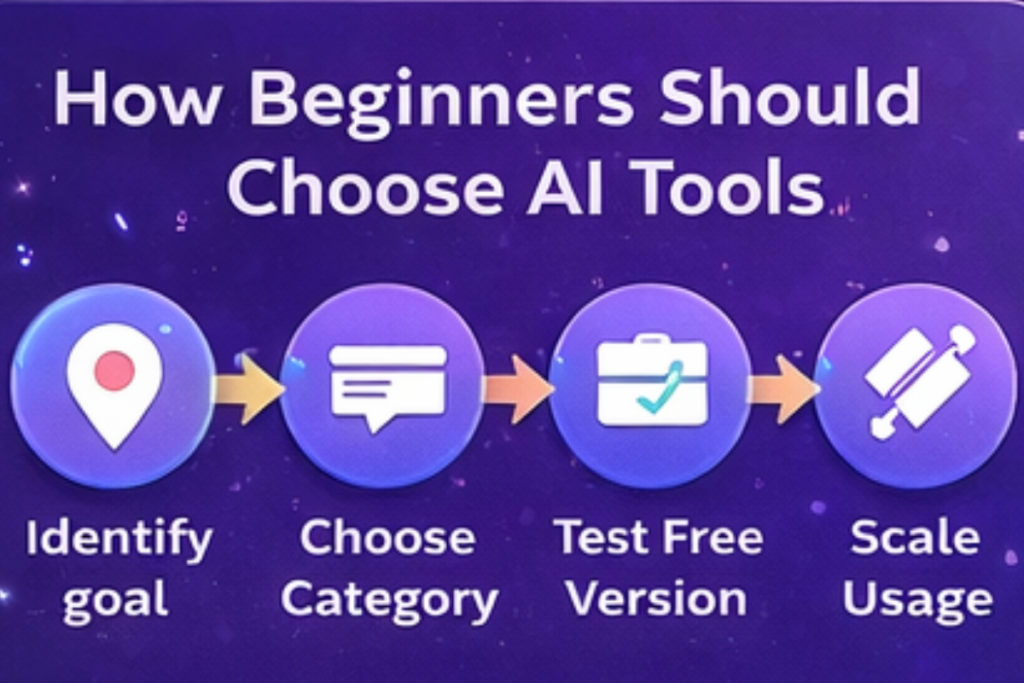
- Leverage Free Tiers: Many top tools offer free plans. ChatGPT, Google Gemini (Flash tier), Canva, Grammarly, and others let you try features without paying. Use these to experiment before upgrading. Beginners should take advantage of these to build comfort.
- Combine Tools: No single AI tool does everything. A common recommendation is to use one AI for writing and another for design. For instance, draft an outline with ChatGPT, polish text with Grammarly, and create visuals in Canva.
- Stay Hands-On: AI is an assistant, not a wizard. Good results come from good prompts. When something goes wrong (e.g. an image prompt yields gibberish text), tweak your input and try again. Over time you’ll learn what works.
- Use Agentic Workflows: In 2026, some tools can run multi-step tasks. For example, ChatGPT’s GPT-5.4 can plan its own solution, meaning it’ll outline steps before answering. Beginners should notice if their AI lets them “see the plan” – it can guide you to refine the task mid-way.
- Ensure Ethical Use: Some AI outputs can be off (biased or incorrect). Always verify important info (AI can “hallucinate”). Tools like Claude emphasize careful answers. For document-heavy tasks, use tools like NotebookLM that cite sources.
- Keep Learning: The AI landscape is evolving fast. New features (like Canva’s AI video or Google’s Gemini in Slides) appear regularly. Set aside time to explore updates; each year introduces beginner-friendly improvements.
Conclusion
AI tools in 2026 are more user-friendly and powerful than ever. For beginners, start with ChatGPT or Google Gemini for general tasks, Canva for visuals, and Grammarly or Notion for writing and organization. Explore others (ElevenLabs, Fathom, etc.) as needed. Each tool has tutorials and communities — don’t be shy to ask how others use them.
Remember, the best AI tool is the one you actually use. Share your experiences: which AI assistant helped you most? What tips do you have for newbies? Leave a comment below or join online forums to compare notes. Happy experimenting, and let AI amplify your creativity and productivity in 2026!